
The Painkiller Test
A 30-second test for any AI workflow idea, and why most “AI features” fail it.

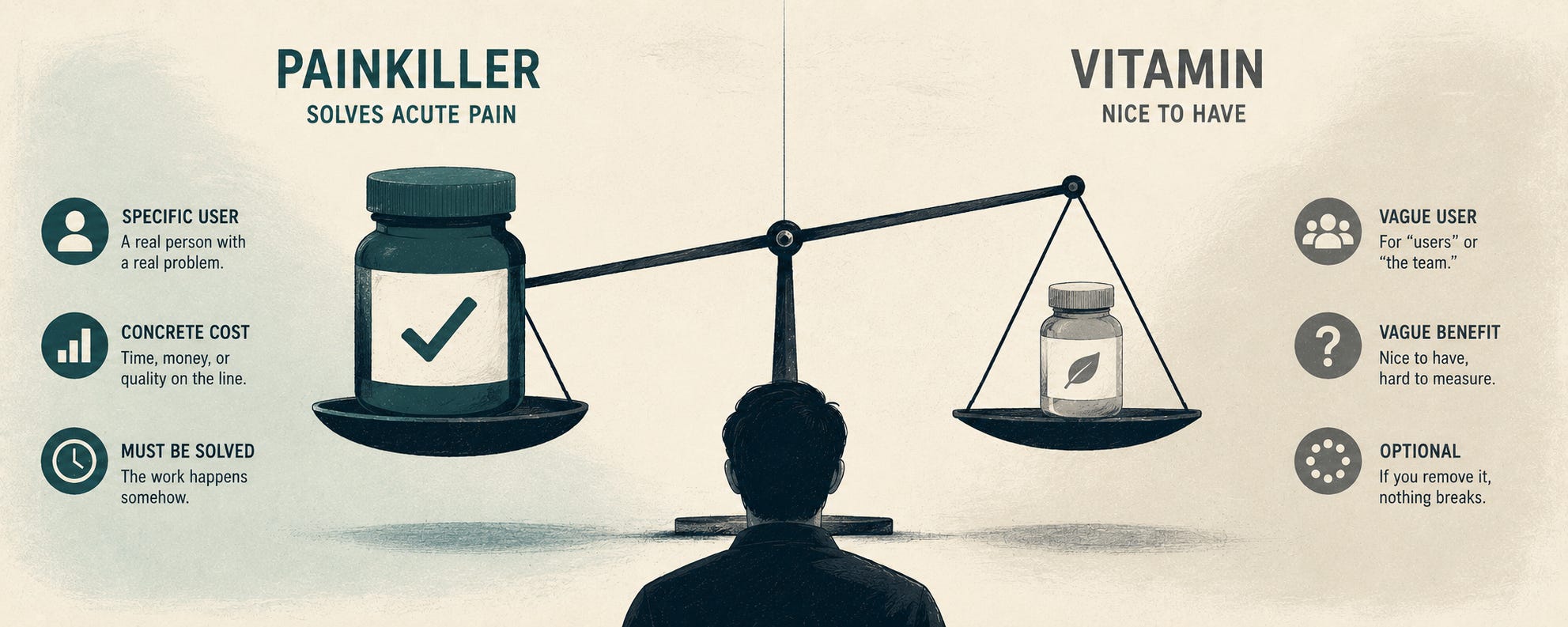
I have watched B2B companies kill more engineering quarters with bad AI ideas than with any other category of project. By the end of this article, you’ll have a 30-second test that filters most of them out before they consume a sprint.
The frame is borrowed from drug marketing, where the painkiller-versus-vitamin distinction has been used for decades to predict adoption. Painkillers solve acute pain; the customer takes them because not taking them is worse. Vitamins are nice to have. The customer takes them because they ought to, in theory, but the consequences of skipping are diffuse.
In B2B software the same distinction predicts whether a feature gets adopted, paid for, and renewed. Painkiller software solves an acute problem the customer is actively losing money or time on. Vitamin software is something the customer thinks they should be using, in principle.
AI features fail this test more than any other category of B2B software I have seen. Here is the test, the signs of a painkiller workflow, the signs of a vitamin workflow, and a few worked examples.
Why AI features fail the painkiller test so often
Most AI features ship to a roadmap. The board asked, the competitor shipped, or the marketing team wanted something to put in the launch deck. The actual user, the person who would run the workflow inside the product, is rarely consulted before scoping.
When you scope from the boardroom rather than from the user, you get vitamins by default. The feature is something a hypothetical user “should” want in some abstract sense, but no specific person at the customer is losing measurable time, money, or quality without it.
The result is what I see in customer Notion pages. An “AI strategy” section with three or four AI features specced out, a prototype that mostly works, and zero adoption. The features ship. Nobody uses them. Six months later the team is wondering what happened.
The painkiller test exists to prevent this. Run it before scoping any AI workflow.
The test
For any candidate AI workflow, answer three questions in 30 seconds.
One. Can you name the specific person, by role, who runs this workflow today and would run the AI-supported version?
If you cannot, if the answer is “the team” or “customer success generally” or “founders,” you are holding a vitamin. Painkillers always have a specific user. The user has a name, a job title, and a calendar slot dedicated to this work. They will tell you, if asked, exactly how much time they spend on it.
Two. Can you state, in concrete numbers, what the workflow costs that person today?
The cost can be in time (”90 minutes per investor update, 12 updates per year”), in error rate (”we mis-route about 15% of support tickets and lose four-figure deals when high-urgency ones land in the wrong queue”), in throughput (”each AE can write five outbound notes per day, we want fifteen”), or in money directly (”we pay a contractor $X per month to do this”).
If the cost is “it would be nice if this were faster,” you are holding a vitamin. Painkillers have concrete numbers attached because the cost is being felt repeatedly and someone has noticed.
Three. If you removed this workflow entirely tomorrow, never built it and never shipped it, would the named person have to find another way to solve the same problem?
If yes, it is a painkiller. The problem is real, the work has to happen somehow, the AI version replaces an existing path. If no, if the work would just not get done and nothing would visibly break, it is a vitamin. The “problem” was actually an aspiration.
Three yeses and you have a painkiller workflow worth scoping. Any no and you are about to spend a sprint on something that will not get adopted.
Three signs of a painkiller workflow
The user can already describe their current workflow step by step, including the parts they hate. They have thought about it. They have complained about it in standups. They have tried to make it less bad with templates, with Notion docs, with delegating it to someone less senior. The painkiller workflow has a manual incumbent that the user is actively trying to escape.
The cost shows up in someone’s calendar. Painkiller workflows consume hours, and those hours are visible somewhere: in a team’s weekly retrospective, in a CEO’s complaint about how long onboarding takes, in a customer success manager’s lament about Mondays. Vitamin workflows don’t show up anywhere because the time they would save is diffuse and unmeasured.
The user has already tried to solve it themselves. They built a Notion template. They wrote a Zapier automation. They hired a contractor for the worst parts. The painkiller workflow has existing partial solutions because the pain is real enough that people improvise around it. Vitamin workflows have no improvisation history because nobody felt enough pain to bother.
Three signs of a vitamin workflow
It came from a roadmap meeting, not from a user. Someone in product strategy said “we should have AI for X.” Nobody at the customer said “I lose six hours a week to X and I would pay to get them back.”
The success criterion is vague. Painkiller workflows have concrete targets like “reduce average prep time from 90 minutes to under 15.” Vitamin workflows have aspirations like “make this easier” or “improve the experience” or “modernize our offering.”
The “user” is plural. Vitamin workflows are for “users” or “customers” or “the team,” which are categories rather than people. Painkiller workflows are for a specific person who has a problem and would notice if you solved it.
Worked examples
A few from real engagements, illustrative.
The investor update workflow is a painkiller. The user is the founder, specifically. The cost is concrete: 90 minutes per update, monthly, 12 times a year. The founder has tried to improve it with templates, with delegating to a chief of staff, with batching updates. None of it really worked. If you removed the workflow tomorrow, the founder would have to write the update by hand again, because investors expect it. Three yeses.
The “smart insights” feature inside a SaaS dashboard is a vitamin. No specific user. No concrete cost. If you removed it tomorrow, nobody would have to do anything differently because nobody was using it for anything specific. Three nos. Will not be adopted. Six months from now this feature will be in the dashboard, untouched, and product will wonder why retention didn’t move.
The sales call summary workflow is a painkiller. The user is the AE, specifically. The cost is concrete: 20 minutes of post-call notes multiplied across however many calls a week. The AE has tried to improve it with Notion templates, dictation apps, and “I’ll write it later” (which never works). If you removed the workflow tomorrow, the AE would have to write the notes themselves, because the next person to touch the deal needs them. Three yeses.
The “AI assistant” chat feature inside a B2B product is a vitamin. No specific user, no concrete workflow, no measurable cost being incurred today. The product team thought it would be cool. The customer might use it once on launch day to see what it does. Three nos. Will not move metrics.
Why this test matters
The test is not fancy. Three questions, 30 seconds, and most AI ideas in most product roadmaps fail it.
That failure rate is the most underappreciated fact about AI in B2B right now. The reason most AI features don’t move metrics is not that the technology is bad. The technology is fine. The reason is that the features were vitamins. They never had a real user, never had a real cost they were replacing, never had a real chance of being adopted.
The teams that ship useful AI in the next year will be the ones that run the painkiller test before scoping and decline to build the vitamins. They will ship fewer AI features and produce more revenue impact, because the features they ship will be replacing real, costly, named pain.
The teams that don’t run the test will produce launch-deck features that nobody uses, and they will wonder why the AI line on their roadmap didn’t move the metrics they hoped it would.
TLDR
Most AI features fail not because the technology doesn’t work but because they are vitamins, not painkillers. Vitamins don’t get adopted.
The Painkiller Test, in 30 seconds: (1) Can you name the specific user by role? (2) Can you state the concrete cost they pay today? (3) If you removed the workflow tomorrow, would that user have to find another way?
Three yeses means painkiller, worth scoping. Any no means vitamin, will not be adopted, do not build.
Painkiller signs: the user can describe their current workflow including the parts they hate, the cost shows up in someone’s calendar, the user has already tried to solve it themselves.
Vitamin signs: the idea came from a roadmap meeting and not a user, the success criterion is vague, the “user” is plural rather than a specific person.
The most underappreciated fact about AI in B2B right now is how many shipped features were vitamins. Run the test before you scope. Decline to build the vitamins.